Description
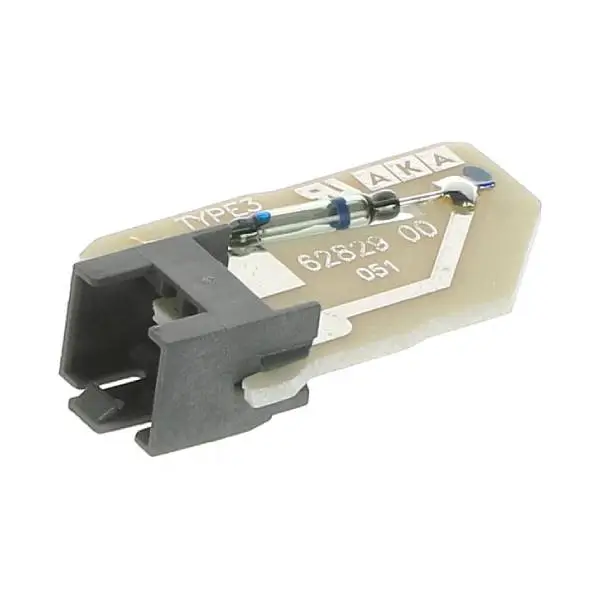
Original Flow Meter Board for Miele Dishwasher Miele 5544031
⚠️ Error code F12, F18 or F19 appears on the display?
Don't rush to replace the dishwasher! In our experience at the service labs, these problems are usually solved by replacing the flowmeter board – a small but critical component that is responsible for measuring the amount of water entering the dishwasher. Using a non-genuine part may cause incorrect readings and repeated problems. Click the 'Check Model Compatibility' button at the top of the page to make sure the part is suitable for your dishwasher.
💡 What does the flow meter do and when should it be replaced?
The Flow Meter is a vital sensor that measures the volume and flow rate of water entering the dishwasher. It sends pulses to the electronic control board to ensure that the dishwasher is filled with the correct amount of water. Our certified technicians recognize the following signs as requiring inspection or replacement:
✅ Error code F12 – Water entry fault at the beginning of a phase (not enough pulses were received from the sensor in the first 5 seconds)
✅ Error code F13 – Water inlet fault at the end of a phase (required amount of water not reached)
✅ Error code F18 – Stationary flow meter (unexpected pulses detected, inlet valve may be stuck open)
✅ Error code F19 – Flow meter is stuck (sensor fan does not rotate freely)
✅ Dishwasher stops in the middle of a program and beeps
✅ Dishes not clean due to partial water filling
✨ Why a genuine Miele part?
Miele dishwashers are renowned for their durability and German quality. The original flow meter panel part number 5544031 is manufactured to the highest quality standards:
✅ Maximum accuracy – precise pulse measurement that ensures optimal water filling
✅ Replaces SKU 5544030 – upgraded version compatible with all previous models
✅ High-quality PCB board – with a durable and reliable Reed switch (magnetic switch)
✅ 12-month warranty – full manufacturer's warranty on original part
💬 Customers who purchased this part noted that the dishwasher returned to working like new immediately after the replacement, and the error codes disappeared completely.
📍 How to find the model number of the dishwasher?
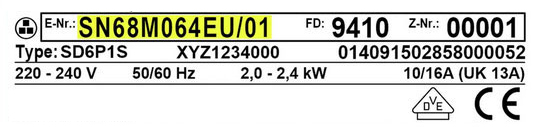
Before ordering, it is important to check for compatibility. The Rating Plate on Miele dishwashers is usually located on the inner door frame – open the dishwasher door and look for a sticker or metal plate on the top or bottom of the frame. Write down the model name (for example: G 5050 SCVi) and the serial number.
💡 Expert tip: On some models, the sticker is located behind the lift-up control panel.
🔧 Installation – Recommended by a certified technician
This is an internal electronic component located inside the dishwasher's casing. Replacement requires dismantling panels, working with electrical connections, and accurate identification of the component. We strongly recommend that you call a qualified technician who will perform the replacement professionally, check the integrity of the water system, and ensure that there are no additional faults.
Those with proven experience in repairing electrical appliances can perform the replacement themselves, while ensuring that:
- Completely disconnect from electricity and water before starting work.
- Carefully disassemble the left side panel
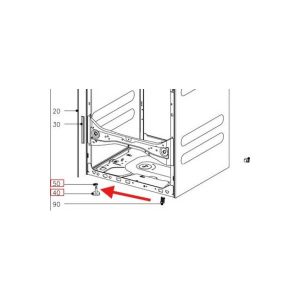
- Locating the flow meter in the water inlet system area
- Replacing the board and connecting the plug securely
⚠️ Incorrect installation may cause damage to the dishwasher or an electrical hazard. If you are not confident in your abilities, call a technician from our service.
📦 Technical specifications
| attribute |
Details |
| Manufacturer's SKU |
5544031 |
| brand |
Miele (Miele) |
| Part type |
Flowmeter PCB |
| Replaces SKU |
5544030 |
| Location on device |
Water inlet area, inside the case |
| Sensor type |
Reed switch (magnetic) |
| Situation |
New, original |
| התקנה |
Self-employed (basic technical knowledge) or technician |
✅ Compatible series
The flow meter panel is suitable for a wide range of Miele dishwashers:
- G1xxx series (Inspira, Classic)
- G2xxx series (Inspira, Classic Plus)
- G4xxx series (Futura Dimension, Futura Classic)
- G5xxx series (Futura Crystal, Futura Slimline)
- G6xxx series (Futura Diamond, Futura Lumen)
Common specific models: G4500, G4510, G4570, G4940, G4960, G5050, G5100, G6915, G6985 and more.
⚠️ Important: Even within the same series there are differences. Use the compatibility check button or contact us with the full model number.
❓ Frequently Asked Questions
What causes the flow meter board to break down?
Common causes are limescale buildup on the internal fan that prevents it from spinning freely, natural wear and tear on the magnetic reed switch after years of use, or electrical connection problems . Preventive maintenance including the use of water softener salt and periodic cleaning can extend the life of the component.
Can I replace the part myself?
This is an internal electronic component, so we recommend calling a qualified technician. Those with proven experience in repairing electrical appliances can perform the replacement themselves, but the dishwasher must be completely disconnected from electricity and water, the side panel must be removed, and the electrical connections must be handled with care. Incorrect installation may cause damage or danger - if in doubt, leave it to the professionals.
What is the difference between SKU 5544030 and 5544031?
Part number 5544031 is the updated version that replaces 5544030. Both parts fit the same models, but 5544031 is the current part available from the manufacturer. If you ordered 5544030, you will receive 5544031 as an official replacement.
Error code F12 – Is it necessarily the flow meter?
Not always. F12 indicates a water inlet problem, which can also be caused by: a closed water tap, a clogged water inlet filter, a kinked inlet hose, or water pressure lower than 0.3 bar. Check the simple causes first. If the problem persists – it is likely the flow meter board.
How do you reset the error code after replacement?
In most cases, the code will automatically reset after replacing the part and running a wash program. If the code continues to appear, unplug the dishwasher for a few minutes and plug it back in to reset the system.








 Plrom Electra service