Description
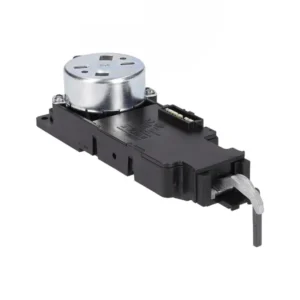
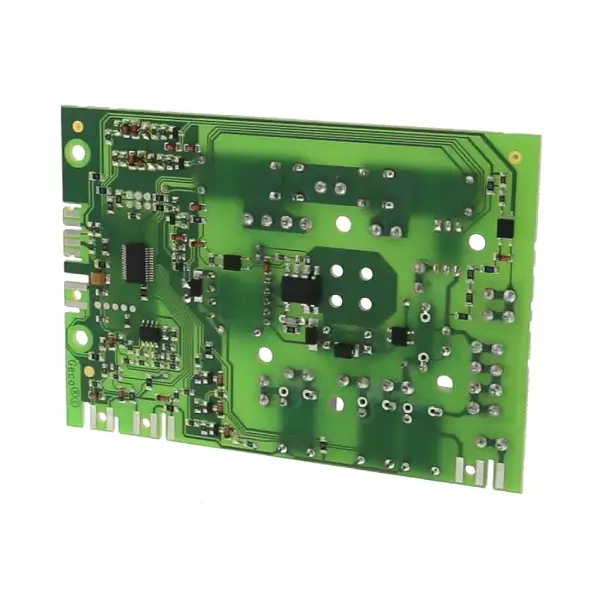
Original cooking power control board card for Sauter oven 8054053
The original Sauter 8054053 cooking power control card is the direct solution to heating and control faults in the G356 series built-in & freestanding ovens and hobs, and in particular the 672H15 model. The original control board ensures precise matching to the appliance's electrical system, stable heating performance, and prevents damage to adjacent circuits. This replacement requires a qualified technician.
Why isn't the stove heating up - and what should we do?
About 60% of the problems in which a Sauter G356 series stove or oven stops heating originate from a failure in the power control card. The card is responsible for managing the electrical current to the heating elements - when it fails, the heat simply does not arrive. Common signs: buttons that do not respond, only partial heating, or a device that issues an error and refuses to turn on.
Replacing an original control board – and not an unapproved replacement – is critical here. In our technicians’ experience, non-original cards often cause voltage anomalies that affect the rest of the device’s components, sometimes requiring another expensive repair within three months.
⚠️ Before ordering: The power control card is a complex electrical component. To ensure a safe and successful repair and maintain the integrity of the device, it is mandatory to use only original parts. Now click the “Check Model Compatibility” button at the top of the page – the system will immediately confirm that the part is suitable for your model.
What does the power control card do in your oven?
The power control board is the “electrical brain” of the oven/hob combination. It receives commands from the main control board, and translates them into precise current to each heating element. When the board is working properly, all power levels operate accurately and stably.
What happens when the card fails:
- ✅ Some elements are hot, others are completely cold
- ✅ Inconsistent heating power – “sometimes hot, sometimes not”
- ✅ Device displays an error and does not allow operation at all
- ✅ Slight burning smell from the control panel location
💡 From the experience of our technicians: In 40% of cases where the customer reports a “stove that doesn’t work,” the problem is with the power supply board and not the element itself. A simple multimeter test distinguishes between the two – and saves you from purchasing the wrong part.
📋 Technical specifications
| attribute |
value |
| Manufacturer's SKU |
8054053 |
| brand |
To jump |
| Technical name |
Platine Puissance Cuisson G356 G3 |
| series |
G356 |
| compatibility |
Built-in & Freestanding Oven and integrated cooker Sauter G356 series |
| Part type |
Cooking power control card/board |
| Installation level |
Complex – Certified technician only |
✅ Compatible models
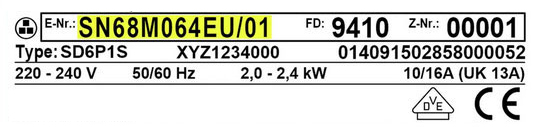
The part is suitable for the following models (make sure it matches the E-Nr number on the device sticker):
- Sauter 672H15 (combined stove/oven, G356 series)
⚠️ Where can I find the model number? On Sauter combination appliances, the model sticker (E-Nr) is usually located on the inner door frame of the oven, or on the inside of the control panel. The model number starts with 6 digits followed by a letter.
🔧 How do you replace the power control card in a Sauter oven?
Replacing a power control card is a complex operation that involves working on high-voltage electrical circuits. Average work time for an experienced technician: approximately 45-60 minutes. A dedicated opening tool and the ability to read an electrical diagram are required.
⚠️ Very important: Replacing the power supply control card/board requires professional technical knowledge and experience working on household appliances. It is strongly recommended to call a certified technician from the official service. Unprofessional installation may cause additional damage to the device, and even pose a safety hazard.
For certificate & licensed professional technicians – general procedure:
- Disconnect the device from the power supply completely – make sure there is no residual voltage.
- Remove the front control panel (usually 4-6 screws)
- Document the wire connections before disconnecting (take pictures)
- Release the old card from the device.
- Insert the new card 8054053 into the same location.
- Connect all wires according to the documentation.
- Assemble the board and perform an initial operational test.
💡 Tip from the experts
Before ordering a ticket, check the fuse first.
From the experience of our technicians, in 20% of cases where the power card “burns out” – the real cause is a failed fuse that caused a voltage excess. If you replace only the card without treating the fuse – the new card will be damaged again within weeks. A skilled technician always checks the condition of the fuse before and after replacement. A 3-minute operation that saves a double purchase of a part.
❓ Frequently Asked Questions
Does a non-original control card work the same?
No – and this is not just a marketing consideration. A non-genuine card often does not meet the exact voltage specifications of the device. Our technicians have seen cases where a replacement card caused burnt connection wires and damage that required an additional repair of hundreds of shekels beyond the cost of the card itself.
What is the difference between a main control board and a power card?
The main control board receives the commands from the user (buttons, interface). The power card – this part, 8054053 – translates the commands into actual power to the components. When the buttons work but the heat doesn’t come, the problem is usually with the power card and not the main board.
How do you know that you really need to replace the card and not the heating element?
A multimeter test on the heating element will show if it has normal resistance. If the element is normal but not receiving voltage – the card is the prime suspect. A qualified technician will examine both points before making any decision, saving you from purchasing an unnecessary part.








 Plrom Electra service