Description
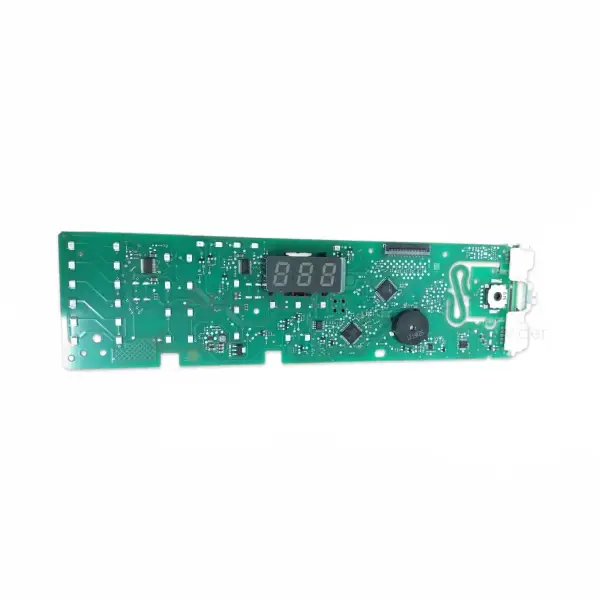
Original EPW 1000 electronic control unit card for Miele washing machine Miele 10859620
The original Miele EPW 1000 electronic control unit card, part number 10859620, is the main “brain” of the WDA, WDD and WKG series washing machines. The component controls all wash cycles, temperature control, spin speeds and the panel display. It resolves critical electronic faults including error codes F39, F41, F43, F45 and F50. Suitable for models WDA100, WDA200, WDD030, WDD100 and WKG120. Only an original part guarantees model-compatible operating software and full operation of all washing programs.
Is the machine displaying an error code F41, F43 or F50? Stopping in the middle of a program for no reason? These are the classic signs of a failure in the EPW 1000 main control unit. In the experience of our technicians, about 60% of the cases where a Miele WDD or WDA series machine displays a recurring F41 error – the direct cause is a failure in the PCB and not in a peripheral component. The original control card 10859620 is the targeted and reliable solution to this malfunction.
Before you order – safety above all! The Miele control unit contains operating software (an internal system that manages all machine operations) that is specifically adapted to the model series. A non-original card may disrupt the entire operation – including heating control, door locking and energy saving programs. Now click the 'Check Model Compatibility' button at the top of the page to ensure full compatibility before ordering.
What causes a Miele machine to turn off in the middle of a program?
A sudden shutdown or freeze in the middle of a wash program usually indicates one of three causes: a failure of the main control board, a power surge that has damaged the PCB, or an internal disconnection between the board and the machine components. Miele WDA and WDD series machines are equipped with a self-diagnostic system - when the PCB detects a malfunction, it displays an error code from the F39-F50 series and stops the program as a protective measure.
Error codes that directly indicate a failure in the EPW 1000:
- ⚠️ F39, F41, F43, F45, F50 – Main control module failure
- ⚠️ Sudden shutdown No error code – usually after a power surge
- ⚠️ Display freezes or unresponsive buttons
- ⚠️ A cycle that begins and never ends – The machine is “stuck” at a certain point
Why only an original Miele control card?
The original EPW 1000 card comes with fully compatible operating software for the WDA, WDD and WKG series – including accurate operating temperatures, EcoPlus programs, and proper connection to the water pressure sensor and temperature sensor. An unapproved card may initially work but become unstable after a few cycles – a phenomenon that leads to expensive double repairs for many customers.
✅ Operating software adapted to the model – including all Miele programs
✅ Perfect compatibility with sensors and tablet screen
✅ Compliance with device warranty requirements
✅ Full QC inspection from the manufacturer
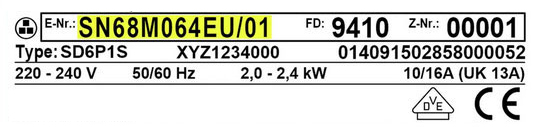
Model Locator Tip: The E-Nr sticker is located on the inside of the washing machine door – on the inside of the door frame. The E-Nr is essential to confirm compatibility before ordering.
🔎 Insight from the field: In our experience, Miele machines that have experienced a power surge in the first 2-3 years of operation - about 35% of them show a PCB failure that appears within 4-6 weeks afterwards. It is worth connecting the machine through a surge protector after replacing the card.
📋 Technical specifications
| attribute |
value |
| Manufacturer's SKU |
10859620 |
| brand |
Honey |
| Component name |
EPW 1000 control unit card |
| Compatible series |
WDA, WDD, WKG |
| Replaces old part number |
9708264 |
| Part type |
PCB – Printed Circuit Board |
| Software |
Model adjustment required by a qualified technician |
| Situation |
Original / Useful |
| התקנה |
Requires a Miele certified technician |
✅ Compatible models
The part fits the following models (make sure it matches the E-Nr number on the sticker):
- WDA100 – Miele WDA Series
- WDA200 – Miele WDA Series
- WDD030 – Miele WDD Series
- WDD100 – Miele WDD Series
- WKG120 – Miele WKG Series
🔧 How do you replace the EPW 1000 control card?
⚠️ Very important: Replacing the EPW 1000 control card requires professional technical knowledge and computerized orientation to the model after installation. It is recommended to call a certified Miele technician to perform the work. The installation takes 30-60 minutes and includes partial disassembly of the front panel and programming the new card to the appliance model.
⚠️ Disconnect the machine from the power supply completely before any work on the control panel.
Work steps (for a qualified technician):
- Disconnect the machine from the power supply and wait a safe amount of time before touching the components.
- Dismantling the front control panel (usually 4-6 screws)
- Disconnecting the cable connectors from the old PCB (documenting location before disconnecting)
- Inserting the new card and connecting the connectors
- MDU direction – Connecting to the infrared interface and setting the model parameters
- Running a test cycle and verifying the error codes
💡 Tip from the experts
In our technicians’ experience, the most common cause of a control panel failing again after replacement is moisture accumulating behind the machine. Make sure there is at least 5 cm of space between the back of the machine and the wall, and that the room is well ventilated. A simple operation that saves a second repair.
❓ Frequently Asked Questions
What is the difference between an original and a used EPW 1000?
A new original card comes directly from Miele with no hours of use, with up-to-date operating software and full QC testing. A used card is a component removed from a working appliance – usually works great and is suitable for budget savings, but has no guarantee of remaining operating hours. Both require computerized adjustment to the model after installation.
Is it mandatory to adjust the card to the model after replacement?
Yes, always. A new EPW 1000 card comes without model settings and will not start the machine without MDU setting. The card must receive the machine parameters – E-Nr number, washing programs, sensor settings – using the Miele diagnostic tool. A Miele-certified technician with MDU equipment can do this on site.
How long does the replacement and alignment process take?
Physically replacing the card takes about 20-30 minutes. Aligning the MDU adds another 15-30 minutes depending on the model. Running a test cycle afterwards takes about another 15 minutes. In total, expect to spend an hour to an hour and a half on a technician visit.








 Plrom Electra service


