Description
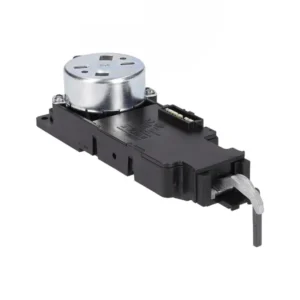
Original control board card for Sauter induction cooker 8074937
The original Sauter control module 8074937 is the electronic unit responsible for the touch interface, control panel and user control of induction hobs. It is suitable for the integrated hob and built-in & freestanding oven models from the 58IES2, 57IET2, 58IES3, 6118IE2 and PI6540 series. Only an original part ensures the proper operation of all hob functions - including booster, child lock and timer.
Is your hob not responding to touch? Is the control panel “frozen” or displaying an error code that won’t go away? This is the most common fault our technicians encounter with induction hobs – and the control module is in most cases the component that needs to be replaced. The control module is the “brain” of the hob: it receives touch commands, translates them into heating actions, and manages all safety systems – from child lock to automatic overheat shutdown.
⚠️ Just before ordering – safety first! To ensure a successful repair and maintain the longevity of your stove, it is essential to use only original parts. A non-original control module may cause repeated malfunctions, impaired safety functions – and expensive damage. Now click the “Check Model Compatibility” button at the top of the page for immediate confirmation that the part is suitable for you.
What causes an induction hob control panel to fail?
The control panel usually fails for three reasons: liquid that has seeped under the glass surface and melted internal contacts, chronic overheating caused by poor ventilation under the hob, and electrical overload due to voltage fluctuations in the network. In the experience of our technicians, about 65% of the faults described as “stoves not responding” originate precisely from this component.
Typical symptoms:
- ✅ The touchpad does not respond to presses at all
- ✅ Error code E0, E1 or F that is not cleared
- ✅ One or more of the heating elements is operating on its own
- ✅ Child lock cannot be activated/cancelled
- ✅ The stove turns on and immediately turns off
Why only an original module? The Sauter touch interface includes a series-specific calibration. A non-original card may “see” unperformed presses, or not recognize real presses – creating an unsafe hob.
📋 Technical specifications
| attribute |
value |
| Manufacturer's SKU |
8074937 |
| brand |
To jump |
| Component type |
Control module – control panel |
| compatibility |
Series 58IES2, 57IET2, 58IES3, 6118IE2, PI6540 |
| Stove type |
אינדוקציה |
| Installation level |
Requires a qualified technician |
✅ Compatible models
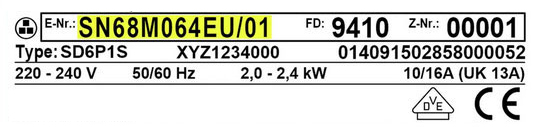
The part is suitable for the following built-in & freestanding oven models (check compatibility with the E-Nr number on the sticker):
58IES2.322HTAB(W), 58IES2.322HTAB(XV), 57IET2.322HTA(BM), 58IET2.322HTAJ(BM), 58IES3.322HTADQ(W), 6118IE2.376HTADP(XX), PI6540TU
💡 Where do you find the model number? On induction hobs, the E-Nr sticker is usually located on the door frame of the integrated oven, or on the back of the hob, accessible after removing the insert panel. Look for a sticker that says “E-Nr” and has an 18-22 character code next to it.
🔧 Can I replace the control module myself?
No. The control module of an induction hob is a complex electronic component that is connected directly to the 220 volt mains and the hob's drive system.
⚠️ Very important: Replacing a control module on an induction hob requires professional technical knowledge, appropriate measuring tools and safe disconnection from the mains. It is strongly recommended to contact a qualified technician from the official service. Unprofessional installation may cause irreversible damage to the hob – and in extreme cases, a safety hazard.
What the technician actually does:
- Disconnecting the stove from the power supply and checking for residual voltage
- Dismantling the access panel and removing the glass panel
- Disconnecting the cable connectors from the old control module
- Installing the new module and checking the strength of connections
- Operation and diagnostics with a test device to confirm all functions
💡 Tip from the experts
From our technicians’ experience, about 30% of the stoves that come to service with a “defective module” are not defective at all – the real problem is in the ribbon cable (FFC cable) that connects the control module to the glass panel. This cable wears out from heat and use, creating a partial contact break. A skilled technician will inspect the cable before deciding to replace the module – and this often saves the entire cost of the part. Ask the technician to also diagnose the cable before replacing it.
❓ Frequently Asked Questions
What is the difference between a control panel and a command panel on an induction hob?
In practice, it is the same component. “Control panel”, “control board” and “control card” are different names for the same electronic unit that manages the stove. SKU 8074937 is the complete control module that includes the touch interface and control circuits.
Is it possible to repair a burned-out control panel instead of replacing it?
Electronic repair of a control module is possible in some cases – when the damage is limited to a single component such as a capacitor or transistor. But in cases of severe fire, corrosion from liquids, or damage to the microchip, replacing the entire module with a genuine part 8074937 is the safest and most reliable solution.
Why does the hob display an error code that does not go away even after resetting?
An error code that returns after a power outage usually indicates a hardware fault, not a software one. Common causes: a faulty control module, a failed temperature sensor, or a problem with the IGBT die that drives the coils. A qualified technician will diagnose and identify the specific component that needs to be replaced.









 Plrom Electra service